For independent salons, and for hair salons, clinics and studios that run on appointments. Customers pick a menu, staff member and time right inside LINE. Confirmations, day-before reminders, rescheduling and cancellation all happen in LINE, and your customer book fills itself in with every follow and booking. Not a marketing-blast tool — just bookings and customer records, kept simple.
How it works
01
Connect your LINE Official Account
Sign up with your email and a 6-digit code. The LINE connection comes with step-by-step instructions and automatic checks.
02
Set your hours and menus
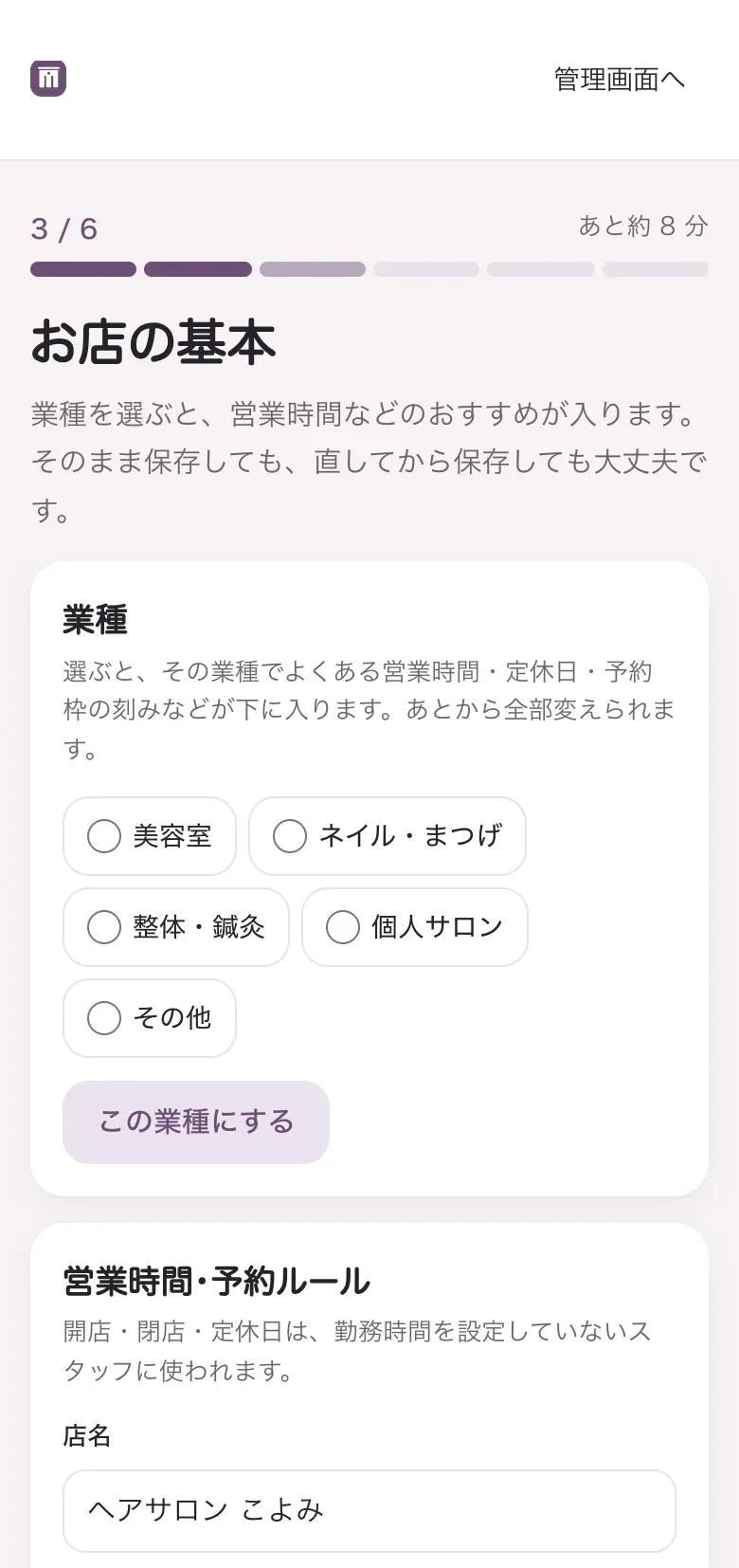
Start from a template for your business (hair salon, nails & lashes, bodywork & acupuncture, private salon), then make a test booking from your own LINE.
03
Open for bookings
Run through the final checklist and you’re open. Download a friend-add QR code too.
What you get
Book without leaving LINE
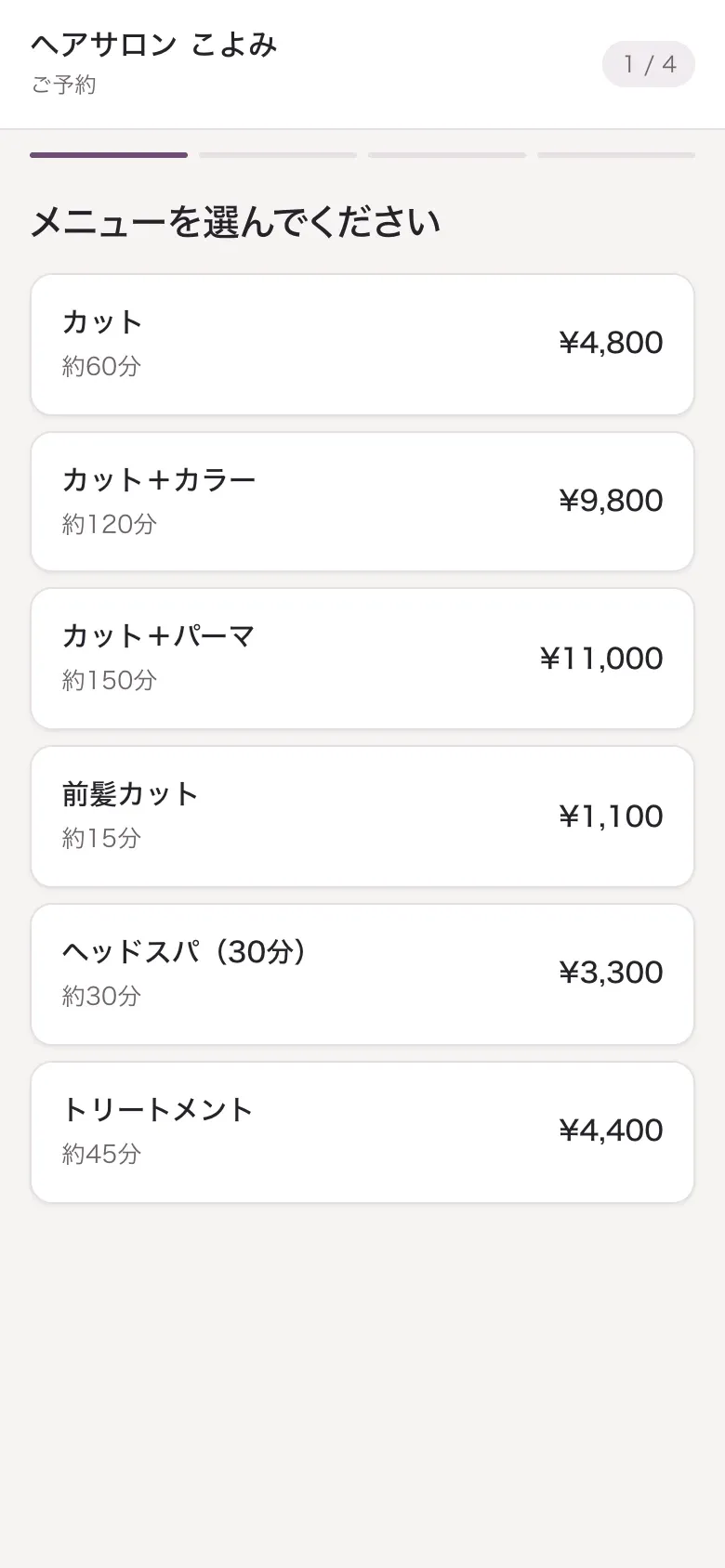
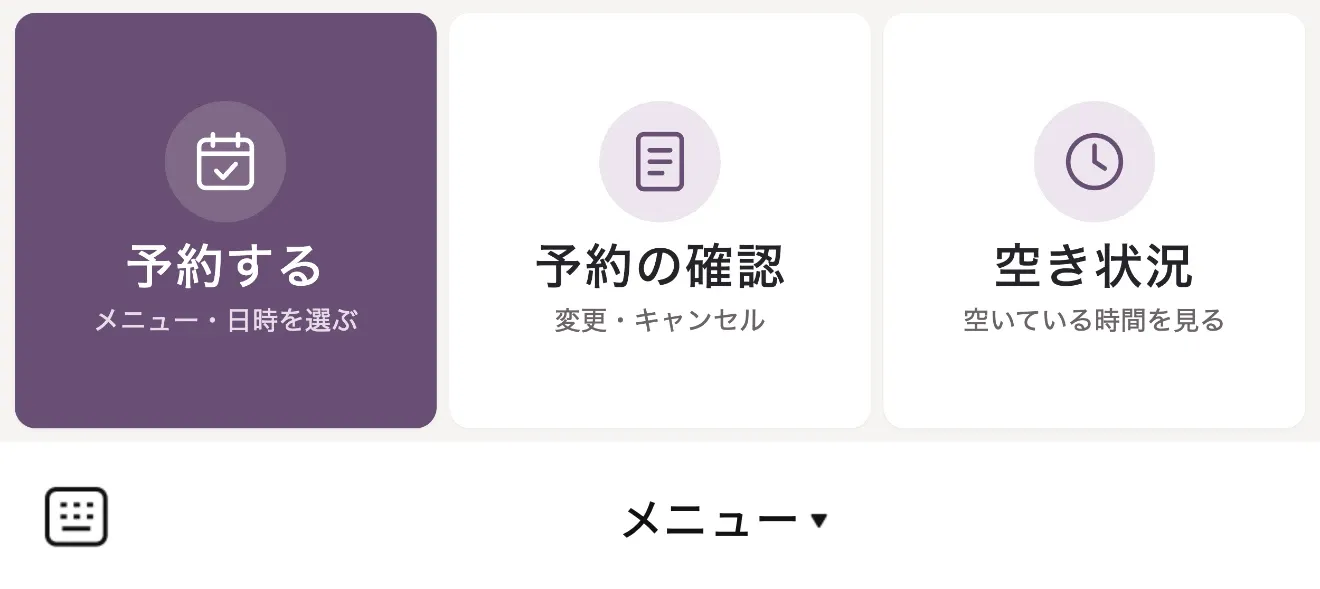
Tap the rich menu, pick a menu, staff member and time. No app install, no sign-up.
Automatic confirmations and reminders, self-service changes
Confirmations arrive in LINE instantly, reminders are automatic, and customers reschedule or cancel themselves.
Off-peak discounts to fill quiet hours
Set weekday, time-window and last-minute discounts; they show as “−10%” on the calendar and in LINE, and the price is locked at booking time.
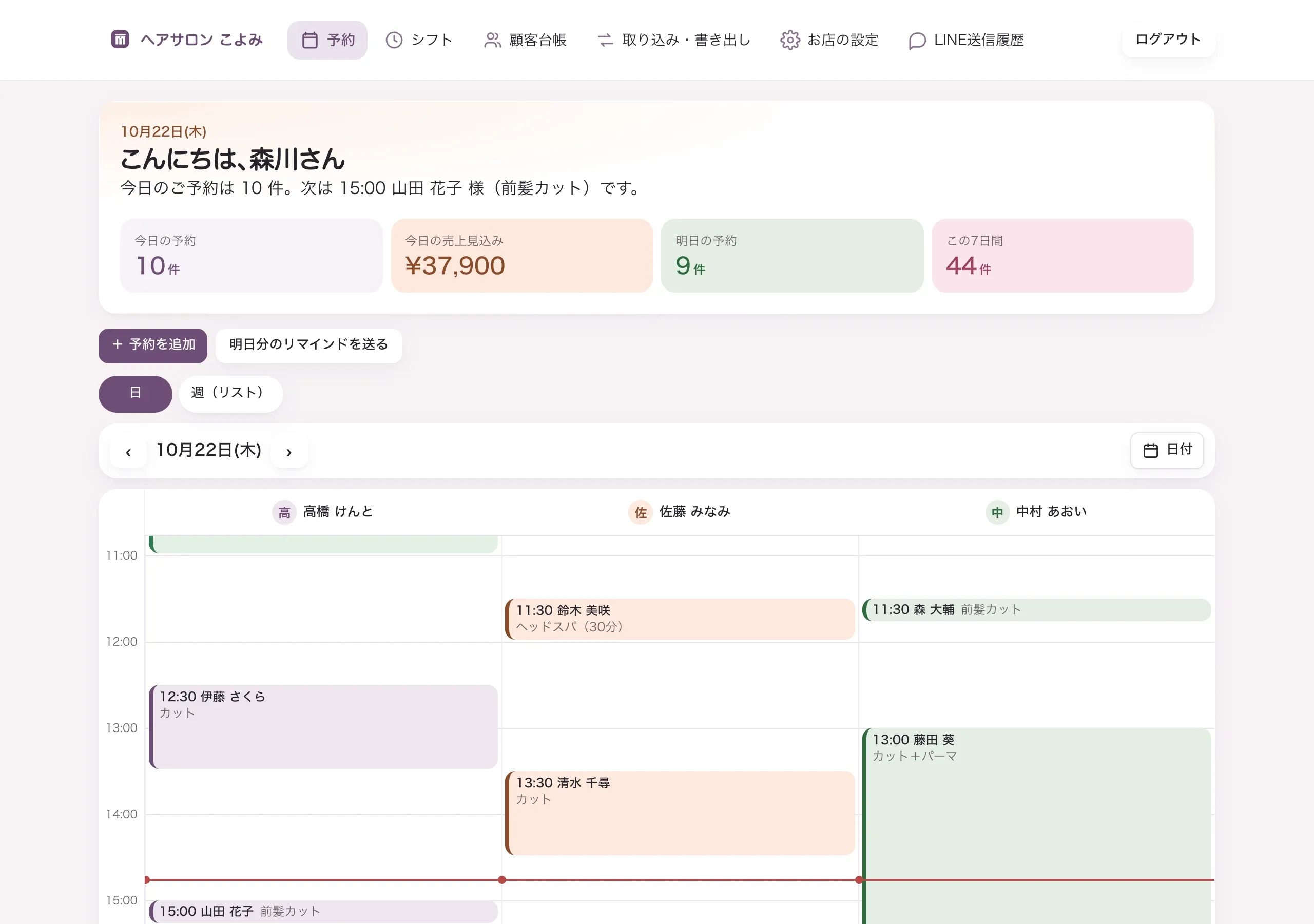
A day calendar with a column per staff member
See the day in one column per staff member, and tap an empty slot to add a phone or walk-in booking on the spot.
A customer book that builds itself, and stays yours
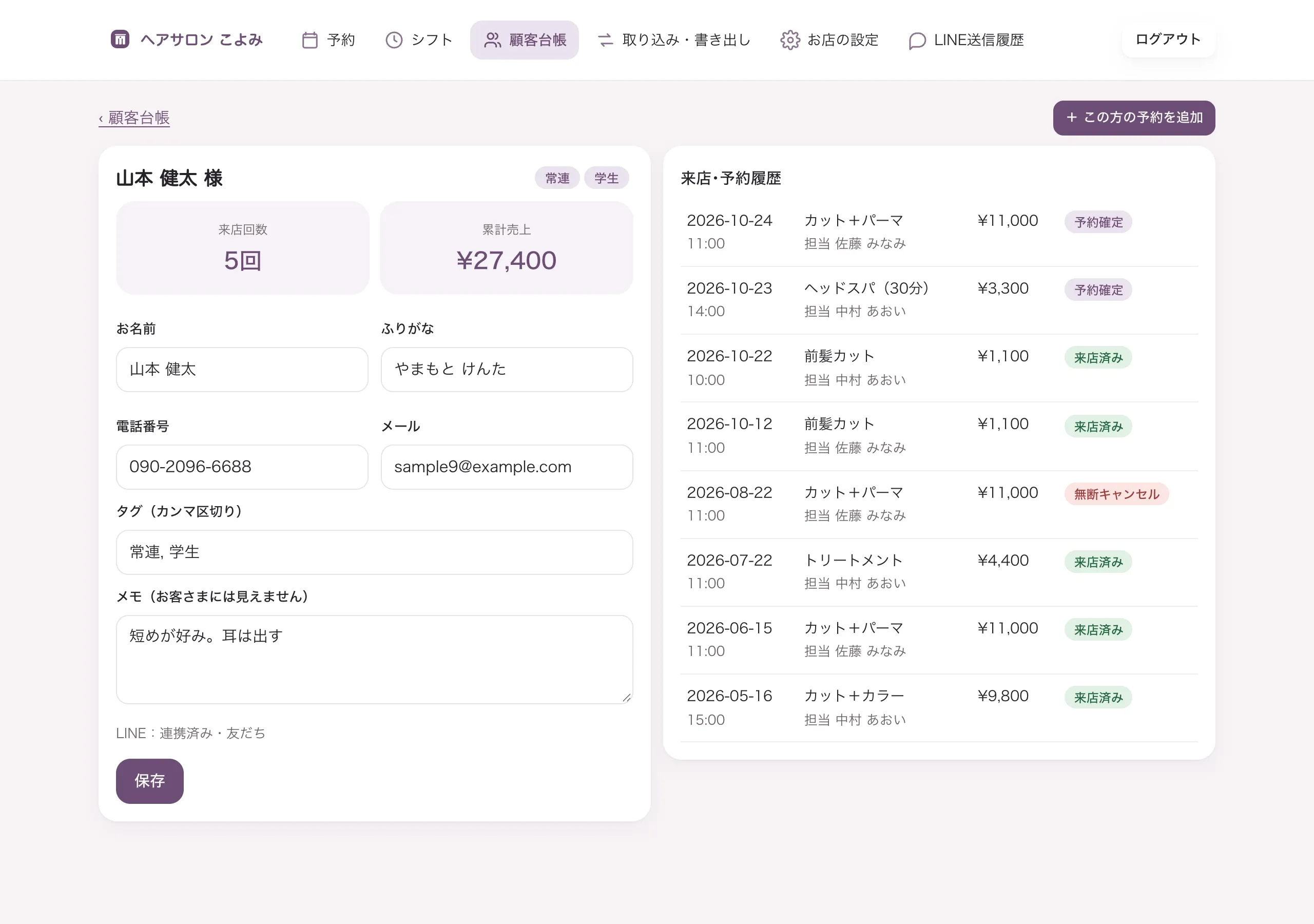
Every follow and booking creates or updates a customer record. Import your Excel or CSV list, and export any time.
Set up yourself in about 10 minutes
Sign up with your email and a 6-digit code, follow the guided setup for LINE, hours and menus, make a test booking and open.
See it in action
All data shown is sample data.
Customer: the menu in the LINE chat
01
Book without leaving LINE
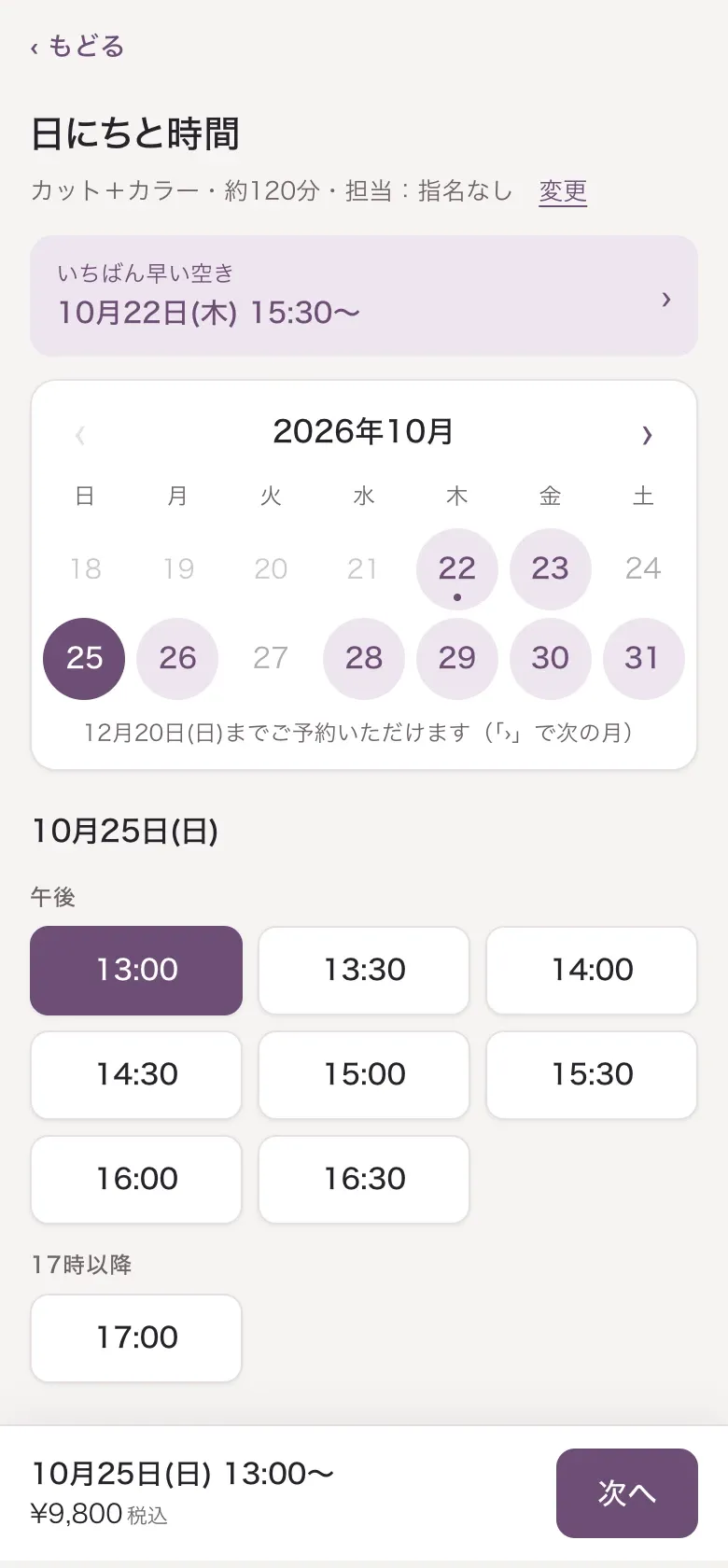
Tap “Book” in the rich menu, then pick a menu, staff member and time. No app install, no sign-up. The calendar shows only bookable days, the earliest free slot is one tap away, and times are grouped into morning, afternoon and after 5 pm.
Customer: choose a date and time
02
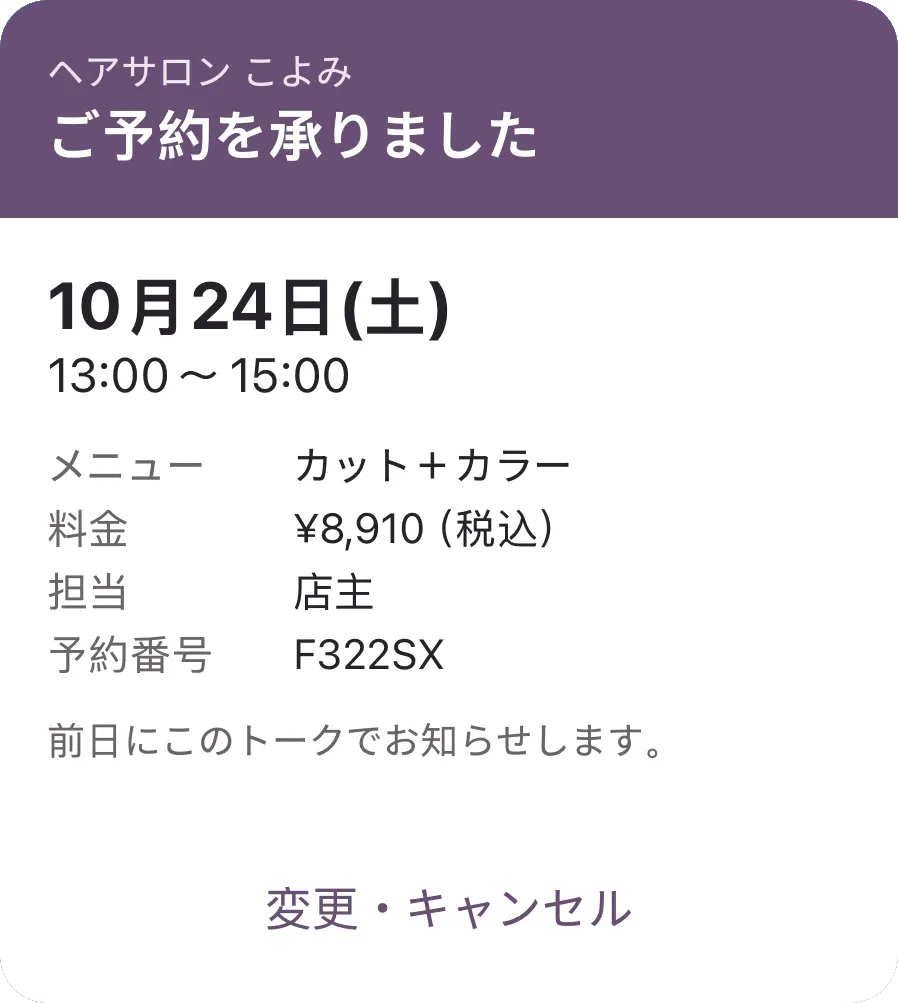
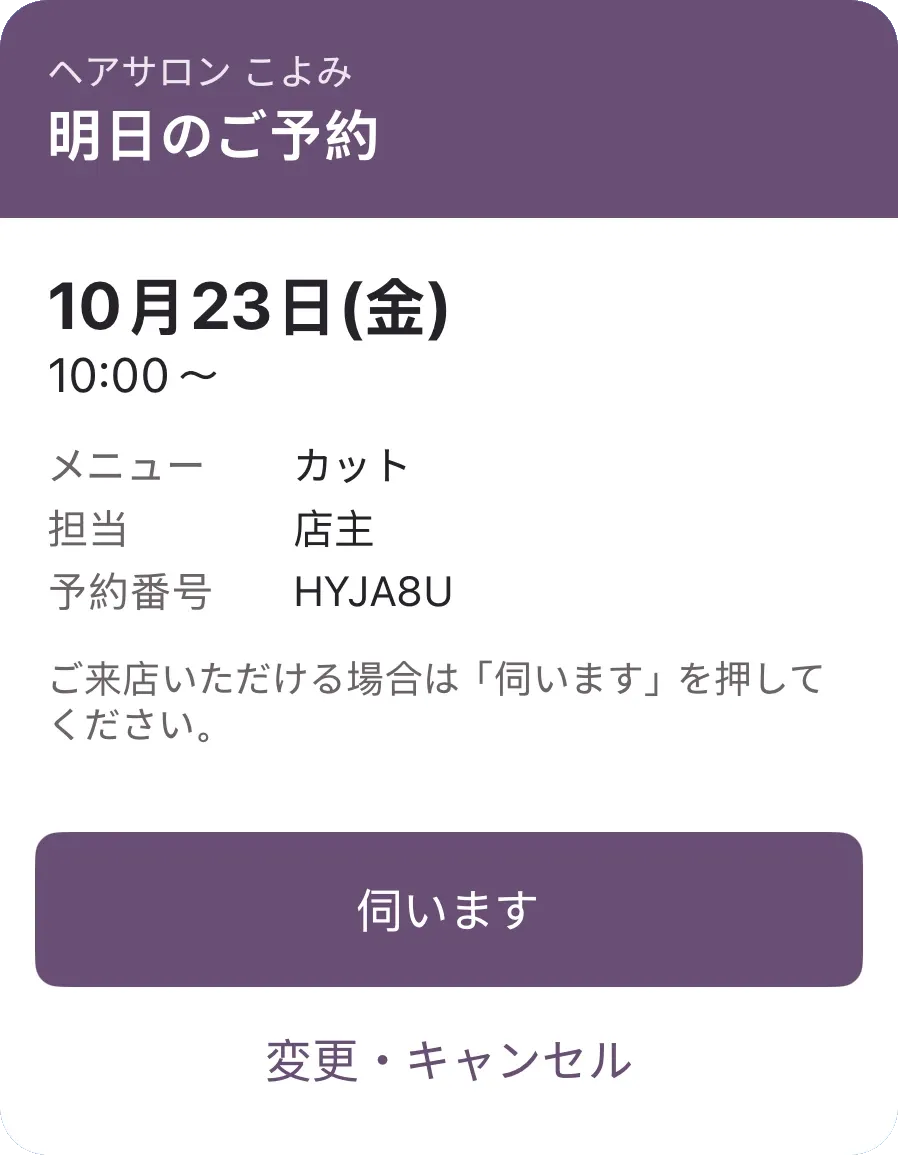
Automatic confirmations and reminders, self-service changes
Confirmations arrive in LINE the moment a booking is made, and day-before reminders are sent automatically — customers don’t have to send anything. Customers reschedule or cancel themselves in LINE, up to a deadline you set.
Customer: instant confirmation
Customer: day-before reminder
03
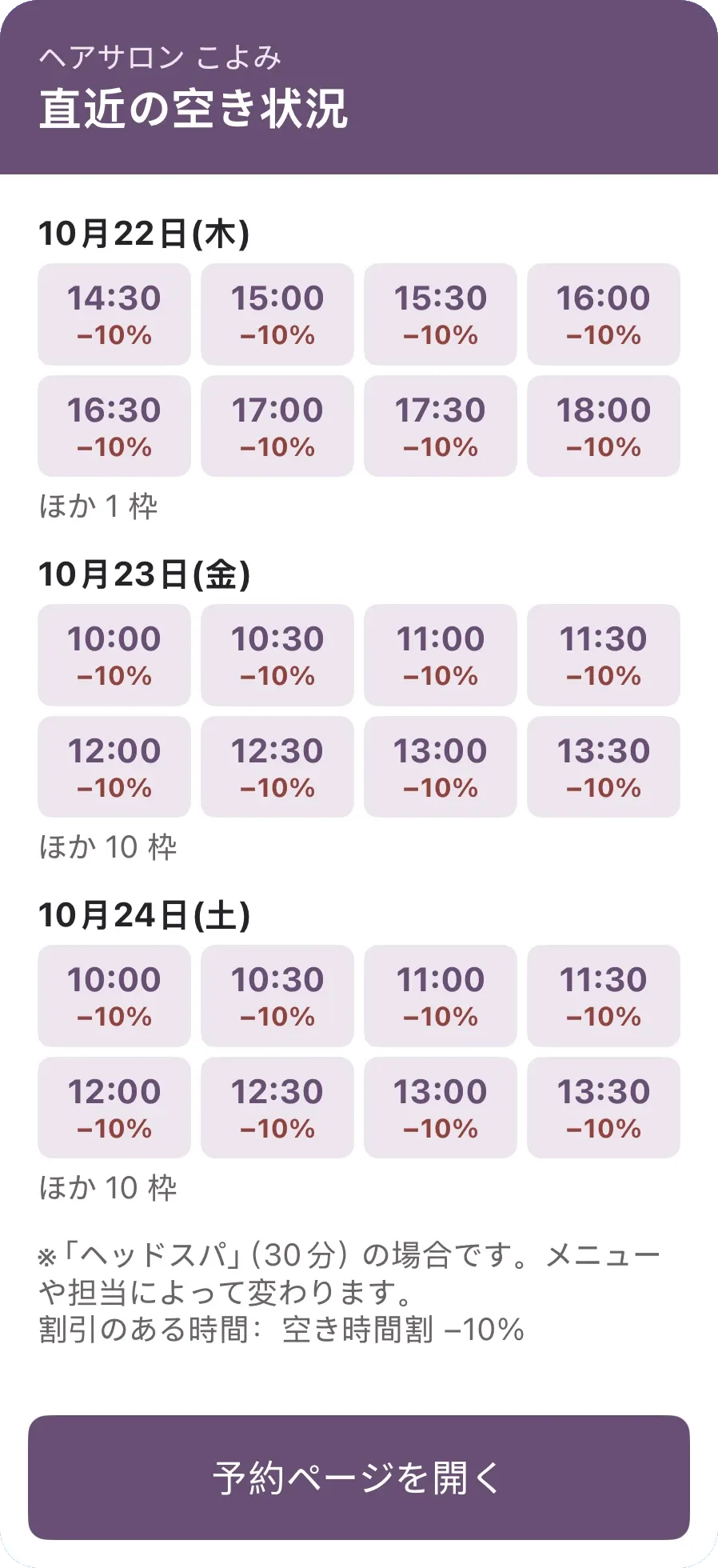
Off-peak discounts to fill quiet hours
Set discounts for weekdays or time windows, plus last-minute deals for slots about to go empty. They show as “−10%” on the calendar, the time list and the LINE availability card, and the price is locked in at booking time.
Customer: open times with discounts
04
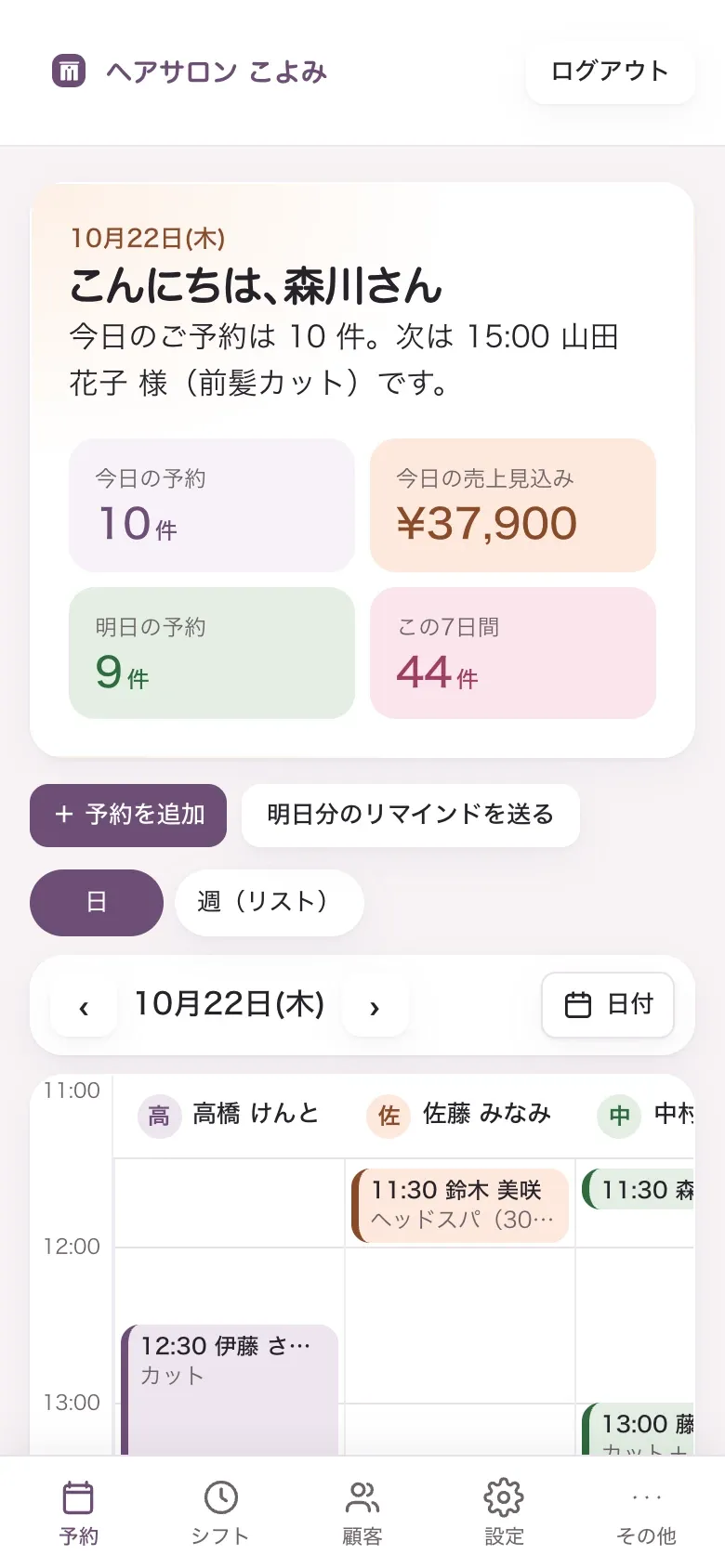
A day calendar with a column per staff member
See the day’s bookings in one column per staff member, and tap an empty slot to add a phone or walk-in booking on the spot. There’s a week list too, and each booking records visited, no-show or cancelled. New bookings and changes reach you right away by email and phone notification, or in the owner’s LINE if you prefer.
Owner: today’s bookings on a phone
05
A customer book that builds itself, and stays yours
Every follow and booking creates or updates a customer record, with visit history, tags and notes in one place. Import the Excel or CSV list you use today, and export your customer book and booking records any time.
Admin: customer book with visit history
06
Set up yourself in about 10 minutes
Sign up with your email and a 6-digit code, then follow the guided setup: LINE connection with step-by-step instructions and automatic checks, hours and menus from a template for your business (hair salon, nails & lashes, bodywork & acupuncture, private salon), a test booking from your own LINE and a final checklist before you open. Download a friend-add QR code too. The LINE connection is checked automatically every day, and you get an email if anything breaks.
Owner: guided setup
What do missed bookings cost you each month?
Enter your own numbers to see roughly how much revenue no-shows and missed bookings take each month.
Enter your numbers to see the result here.
Lost per month
Koyomise monthly feefrom ¥2,980total payable
Per year
Automatic reminders in LINE. Bookings taken around the clock.
Day-before reminders and after-hours bookings, handled automatically in your shop's LINE.
Estimate based on the numbers you enter. Your numbers are not saved or sent anywhere; everything is calculated on this page.
Pricing
Prices are shown as the total amount payable.
New sign-up offer: first 10 shops, until December 31, 2026
The first month stays free, months 2–3 are half price, and the regular price applies from month 4. Applies to shops that sign up (register a card) by December 31, 2026 (Japan time) or until the first 10 shops have signed up, whichever comes first. New sign-ups for Koyomise monthly plans (Solo, Team, Large team) only, for the first shop of each account; shops already paying monthly and the Done-for-you setup are not eligible. The discount is applied automatically — no code needed. Once 10 shops have signed up or the deadline passes, the offer ends and new sign-ups pay the regular price (the sign-up page in the admin shows whether it is still running).
Solo
¥2,980/ mo per shop
total payableSetup fee ¥0First month free, cancel anytime
Prices are per shop. You can manage several shops from one account and add shops from the admin screen (one saved card works for every shop). The free trial is once per account.
Q&A
FAQ
QCan I take bookings through LINE?
Yes. Customers open your LINE Official Account chat, tap “予約する” (Book) in the rich menu, and choose a menu, staff member and time — no app or sign-up needed. Confirmations and day-before reminders arrive in LINE automatically, and customers can reschedule or cancel from LINE themselves.
QHow much does it cost per month?
Monthly prices per shop (total amount payable): Solo ¥2,980/mo (1 staff member), Team ¥4,980/mo (Up to 5 staff), Large team ¥9,980/mo (Up to 20 staff). No setup fee, no limit on bookings or customers, and the first month is free. New sign-up offer: first 10 shops, until December 31, 2026: months 2–3 at half price (Solo ¥1,490, Team ¥2,490, Large team ¥4,990). Only the first shop of each account is eligible.
QIs there a free trial?
Yes. The first month from sign-up is free and no credit card is needed during the trial; you are never charged unless you add one. The free trial is once per account (and once per LINE Official Account). Shops added during the trial are free until the same date; shops added after it have no trial and need a plan before taking bookings. New sign-up offer: first 10 shops, until December 31, 2026: months 2–3 at half price (Solo ¥1,490, Team ¥2,490, Large team ¥4,990). Only the first shop of each account is eligible.
QDo I need a LINE Official Account?
Yes — the free plan works. You connect it yourself by following the on-screen steps, and the setup is checked automatically. If you don’t have an account yet, we can set it up for you (Done-for-you setup).
QAre LINE message fees extra?
LINE Official Account fees are paid by the shop directly to LINE. Counted messages include confirmations, day-before reminders, notices when customers change or cancel online, and notifications to the owner’s LINE (only if you turn them on) — about 2 messages per booking. Replies to customers’ messages and menu taps are not counted. LINE’s free plan (Communication plan) includes 200 messages a month, which covers roughly 100 bookings a month (as of November 2026; check LY Corporation’s pricing page for the latest).
QHow many staff can use it?
Prices are per shop, and plans are based on how many staff take bookings: Solo ¥2,980/mo (1 staff member), Team ¥4,980/mo (Up to 5 staff), Large team ¥9,980/mo (Up to 20 staff). You can switch between several shops with one account (same email and password) and choose a plan for each shop. For 21 or more staff, please contact us. There is no limit on customers or bookings.
QCan I switch plans later?
Yes. You can switch any time from Plan & billing in the admin. Moving to a plan with more staff takes effect immediately, and the difference is prorated onto your next payment. Moving to a plan with fewer staff takes effect from your next payment date (the current period is not refunded). During the free trial, any change takes effect immediately and the trial end date stays the same. Staff beyond the new plan's limit stop taking bookings from the day the change takes effect, most recently added first (their records and bookings are kept). Moving back to a larger plan doesn't restart them automatically — you can turn them back on in staff settings.
QDoes it sync with Hot Pepper Beauty?
We plan to build automatic import of Hot Pepper Beauty bookings into Koyomise: new customers find you on Hot Pepper Beauty, regulars book through LINE, and you see every booking in one Koyomise calendar. Until then, please also enter Hot Pepper Beauty bookings in Koyomise so the same time slot isn’t booked twice.
QCan I cancel anytime? Is there a cancellation fee?
Yes — there is no minimum term and no cancellation fee. Cancel from the admin screen (お店の設定 → パスワード・解約); you can keep using it until the end of the current billing period (no prorated refunds). You can export your customer list and bookings to Excel/CSV at any time, and for 90 days after cancelling a paid plan you can still export or resume. After that, the data is deleted.
QHow does support work?
Support is by email. Everything stays in writing, so you can look back at the setup steps any time. Steps come as written guides with screenshots.
QIs it secure? How is card information handled?
Card details are processed on Stripe's payment page and are never stored on Koyomise's servers. Your LINE Official Account connection details are stored encrypted. All updates happen on our servers, so there's nothing you need to do. For how we handled October 2026, see our blog post (in Japanese).
Let your shop’s LINE take the bookings.
First month free, and no credit card needed during the trial.